I didn't know this so I am sharing it
Windows OS
if you are in a directory using CMD and want to open explorer from that same place type in "Start ." no quotes of course and explorer will open in that directory
Mac OS X
if you are in terminal and want to open finder in that directory just type in "open ." and you will have finder open.
Linux (I use CentOS7)
just create an alias with this command alias open='xdc-open &> /dev/null'
I hope you can profit from this
Monday, January 29, 2018

Wednesday, January 3, 2018

Saturday, December 30, 2017
all lower case file names
if you need to convert every file to lower case in a folder in OS X this command will do that.
for f in *; do mv "$f" "`echo $f | tr "[:upper:]" "[:lower:]"`"; done
Tuesday, December 19, 2017
Creating a bootable USB or SD on OSX
First, verify the path to your SD card. You can do this by running the following command from terminal:
diskutil list
The output shows a list of disks currently mounted on the system. Here's the relevant line from my output:
/dev/disk3
#:                       TYPE NAME                    SIZE       IDENTIFIER
0:     FDisk_partition_scheme                        *8.0 GB     disk3
1:                 DOS_FAT_32 RPISDCARD               8.0 GB     disk3s1
In this case I can verify
/dev/disk3 is my SD card because the TYPE, NAME and SIZE values are correct.
If you have an existing partition on the disk you may need to unmount it, otherwise you'll get a "Resource busy" error message when you try to write the image.
diskutil unmount /dev/disk3s1
Now to write the image file to the disk. Note the 'r' added to
rdisk3 which drastically improves write performance by telling dd to operate in raw disk mode:sudo dd if=RetroPieImage_ver2.3.img of=/dev/rdisk3 bs=1m
Depending on the size of your SDcard this may take a while. You can press
CTRL+T to see the current status of dd. As an example for my Samsung 8GB SD card the write speed was 12MB/s the command took 11mins to complete.Friday, December 8, 2017
HP 800 G1 upgrade 10.13.1 to 10.13.2
if you are going to upgrade from 10.13.1 to 10.13.2 follow these steps for a efforts free upgrade
first upgrade clover to r4334
then download the follow kext and put the in your kexts EFI folder
Lilu.txt version 1.2.1
NvidiaGraphicsFixup.kext 1.2.1 <- if you have an Nvidia graphics card
The reboot
now you can upgrade from the App Store to 10.13.2 - failing to do so will cause your 800 G1 to not boot
Tuesday, October 3, 2017
Hackintosh HP 800 G1 Tutorial Version 2.0 OS X High Sierra
This tutorial is created for test and experimentation, use at your own risk, always backup your data before creating experimental OS's.
Here are the steps to get OS X High Sierra running on a HP 800 G1, this process should work for SFF and tower models of the same type.
Bios version L01 v02.71 05/09/2017
ME Firmware V 9.0.31.1487
If your system does not have these versions you results may vary.
Bios settings
Apply bios defaults
Storage - Storage options = AHCI
This tutorial is based on the method of installing OS X onto the hard drive from a real Mac running OS X 10.13, other methods will require additional steps and research
After you have installed OS X on the drive that your are going to put into the HP 800 G1, you will need to install Clover Boot loader version 4233 or higher. Make sure to install Clover on the disk that will be going into the HP.
Note: all these steps needs to be done on the real Mac, DO NOT install clover on your real Mac, go slow and verify before you proceed.
Select the options as pictured.
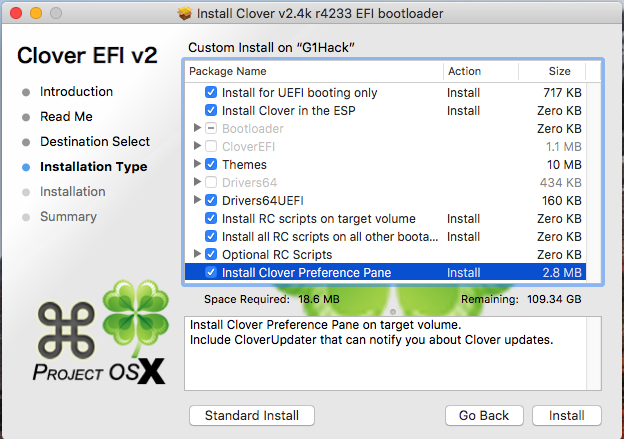
You will need to obtain the following files (google it and download it)
Clover_v2.4k_r4233
Clover Configurator 4.53
HWMonitor 6.25-333
AppleHDADisabler.kext 1.0.1
CodecCommander.kext 2.6.3
FakeSMC_ACPISensors.kext 6.25-333
FakeSMC_CPUSensors.kext 6.25-333
FakeSMC_GPUSensors.kext 6.25-333
FakeSMC_LPCSensors.kext 6.25-333
FakeSMC.kext 6.25-333
IntelMausiEthernet.kext 2.3.0d0
Lilu.kext 1.1.7
USBInjectAll.kext 0.6.2
VoodooHDA.kext 2.8.9
You will need to add the following Kexts to /EFI/Clover/kexts


<?xml version="1.0" encoding="UTF-8"?>
<!DOCTYPE plist PUBLIC "-//Apple//DTD PLIST 1.0//EN" "http://www.apple.com/DTDs/PropertyList-1.0.dtd">
<plist version="1.0">
<dict>
<key>ACPI</key>
<dict>
<key>DSDT</key>
<dict>
<key>Debug</key>
<false/>
<key>DropOEM_DSM</key>
<false/>
<key>Fixes</key>
<dict>
<key>AddPNLF_1000000</key>
<true/>
<key>FIX_ACST_4000000</key>
<true/>
<key>FIX_ADP1_800000</key>
<true/>
<key>FIX_INTELGFX_100000</key>
<true/>
<key>FIX_RTC_20000</key>
<true/>
<key>FIX_S3D_2000000</key>
<true/>
<key>FIX_TMR_40000</key>
<true/>
<key>FIX_WAK_200000</key>
<true/>
<key>FixRegions_10000000</key>
<true/>
</dict>
<key>Name</key>
<string>DSDT.aml</string>
<key>ReuseFFFF</key>
<false/>
</dict>
<key>DropTables</key>
<array>
<dict>
<key>Signature</key>
<string>DMAR</string>
</dict>
<dict>
<key>Signature</key>
<string>SSDT</string>
<key>TableId</key>
<string>CpuPm</string>
</dict>
<dict>
<key>Signature</key>
<string>SSDT</string>
<key>TableId</key>
<string>Cpu0Ist</string>
</dict>
</array>
<key>HaltEnabler</key>
<true/>
<key>SSDT</key>
<dict>
<key>DropOem</key>
<false/>
<key>Generate</key>
<dict>
<key>CStates</key>
<true/>
<key>PStates</key>
<true/>
</dict>
</dict>
</dict>
<key>Boot</key>
<dict>
<key>Arguments</key>
<string>npci=0x2000 kext-dev-mode=1 rootless=0</string>
<key>Debug</key>
<false/>
<key>DefaultLoader</key>
<string>boot.efi</string>
<key>DefaultVolume</key>
<string>G1Hack</string>
<key>Legacy</key>
<string>PBR</string>
<key>Secure</key>
<false/>
<key>Timeout</key>
<integer>5</integer>
<key>XMPDetection</key>
<false/>
</dict>
<key>CPU</key>
<dict>
<key>C2</key>
<true/>
<key>C4</key>
<true/>
<key>C6</key>
<true/>
<key>UseARTFrequency</key>
<false/>
</dict>
<key>Devices</key>
<dict>
<key>Audio</key>
<dict>
<key>ResetHDA</key>
<true/>
</dict>
<key>FakeID</key>
<dict>
<key>IntelGFX</key>
<string>0x04128086</string>
</dict>
<key>USB</key>
<dict>
<key>AddClockID</key>
<true/>
<key>FixOwnership</key>
<true/>
<key>Inject</key>
<true/>
</dict>
</dict>
<key>GUI</key>
<dict>
<key>Mouse</key>
<dict>
<key>DoubleClick</key>
<integer>500</integer>
<key>Enabled</key>
<false/>
<key>Mirror</key>
<false/>
<key>Speed</key>
<integer>8</integer>
</dict>
<key>ScreenResolution</key>
<string>1280x1024</string>
<key>Theme</key>
<string>Classic Mac OS</string>
</dict>
<key>Graphics</key>
<dict>
<key>Inject</key>
<dict>
<key>ATI</key>
<false/>
<key>Intel</key>
<true/>
<key>NVidia</key>
<false/>
</dict>
<key>LoadVBios</key>
<true/>
<key>NvidiaSingle</key>
<false/>
<key>ig-platform-id</key>
<string>0x0D220003</string>
</dict>
<key>KernelAndKextPatches</key>
<dict>
<key>AppleIntelCPUPM</key>
<true/>
<key>AppleRTC</key>
<true/>
<key>Debug</key>
<false/>
<key>KernelCpu</key>
<false/>
<key>KernelHaswellE</key>
<false/>
<key>KernelLapic</key>
<false/>
<key>KernelPm</key>
<true/>
<key>KextsToPatch</key>
<array>
<dict>
<key>Comment</key>
<string>Trim Enabler</string>
<key>Disabled</key>
<false/>
<key>Find</key>
<data>
AEFQUExFIFNTRAA=
</data>
<key>Name</key>
<string>IOAHCIBlockStorage</string>
<key>Replace</key>
<data>
AAAAAAAAAAAAAAA=
</data>
</dict>
<dict>
<key>Comment</key>
<string>Raise USB Port Limit</string>
<key>Disabled</key>
<false/>
<key>Find</key>
<data>
g32MEA==
</data>
<key>MatchOS</key>
<string>10.13.x</string>
<key>Name</key>
<string>AppleUSBXHCIPCI</string>
<key>Replace</key>
<data>
g32MGw==
</data>
</dict>
</array>
</dict>
<key>RtVariables</key>
<dict>
<key>BooterConfig</key>
<string>0x28</string>
<key>CsrActiveConfig</key>
<string>0x67</string>
<key>MLB</key>
<string>C02032109R5DC771H</string>
<key>ROM</key>
<string>UseMacAddr0</string>
</dict>
<key>SMBIOS</key>
<dict>
<key>BiosReleaseDate</key>
<string>09/03/2013</string>
<key>BiosVendor</key>
<string>Apple Inc.</string>
<key>BiosVersion</key>
<string>IM141.88Z.0118.B00.1309031248</string>
<key>Board-ID</key>
<string>Mac-031B6874CF7F642A</string>
<key>BoardManufacturer</key>
<string>Apple Inc.</string>
<key>BoardType</key>
<integer>10</integer>
<key>ChassisAssetTag</key>
<string>iMac-Aluminum</string>
<key>ChassisManufacturer</key>
<string>Apple Inc.</string>
<key>ChassisType</key>
<string>13</string>
<key>Family</key>
<string>iMac</string>
<key>Manufacturer</key>
<string>Apple Inc.</string>
<key>ProductName</key>
<string>iMac14,1</string>
<key>SerialNumber</key>
<string>GETYOUROWN</string>
<key>Trust</key>
<false/>
<key>Version</key>
<string>1.0</string>
</dict>
<key>SystemParameters</key>
<dict>
<key>InjectKexts</key>
<string>Detect</string>
<key>InjectSystemID</key>
<true/>
</dict>
</dict>
</plist>
Here are the steps to get OS X High Sierra running on a HP 800 G1, this process should work for SFF and tower models of the same type.
Bios version L01 v02.71 05/09/2017
ME Firmware V 9.0.31.1487
If your system does not have these versions you results may vary.
Bios settings
Apply bios defaults
Storage - Storage options = AHCI
This tutorial is based on the method of installing OS X onto the hard drive from a real Mac running OS X 10.13, other methods will require additional steps and research
After you have installed OS X on the drive that your are going to put into the HP 800 G1, you will need to install Clover Boot loader version 4233 or higher. Make sure to install Clover on the disk that will be going into the HP.
Note: all these steps needs to be done on the real Mac, DO NOT install clover on your real Mac, go slow and verify before you proceed.
Select the options as pictured.
You will need to obtain the following files (google it and download it)
Clover_v2.4k_r4233
Clover Configurator 4.53
HWMonitor 6.25-333
AppleHDADisabler.kext 1.0.1
CodecCommander.kext 2.6.3
FakeSMC_ACPISensors.kext 6.25-333
FakeSMC_CPUSensors.kext 6.25-333
FakeSMC_GPUSensors.kext 6.25-333
FakeSMC_LPCSensors.kext 6.25-333
FakeSMC.kext 6.25-333
IntelMausiEthernet.kext 2.3.0d0
Lilu.kext 1.1.7
USBInjectAll.kext 0.6.2
VoodooHDA.kext 2.8.9
You will need to add the following Kexts to /EFI/Clover/kexts

The below are the Clover options you will need to apply using Clover Configurator


<?xml version="1.0" encoding="UTF-8"?>
<!DOCTYPE plist PUBLIC "-//Apple//DTD PLIST 1.0//EN" "http://www.apple.com/DTDs/PropertyList-1.0.dtd">
<plist version="1.0">
<dict>
<key>ACPI</key>
<dict>
<key>DSDT</key>
<dict>
<key>Debug</key>
<false/>
<key>DropOEM_DSM</key>
<false/>
<key>Fixes</key>
<dict>
<key>AddPNLF_1000000</key>
<true/>
<key>FIX_ACST_4000000</key>
<true/>
<key>FIX_ADP1_800000</key>
<true/>
<key>FIX_INTELGFX_100000</key>
<true/>
<key>FIX_RTC_20000</key>
<true/>
<key>FIX_S3D_2000000</key>
<true/>
<key>FIX_TMR_40000</key>
<true/>
<key>FIX_WAK_200000</key>
<true/>
<key>FixRegions_10000000</key>
<true/>
</dict>
<key>Name</key>
<string>DSDT.aml</string>
<key>ReuseFFFF</key>
<false/>
</dict>
<key>DropTables</key>
<array>
<dict>
<key>Signature</key>
<string>DMAR</string>
</dict>
<dict>
<key>Signature</key>
<string>SSDT</string>
<key>TableId</key>
<string>CpuPm</string>
</dict>
<dict>
<key>Signature</key>
<string>SSDT</string>
<key>TableId</key>
<string>Cpu0Ist</string>
</dict>
</array>
<key>HaltEnabler</key>
<true/>
<key>SSDT</key>
<dict>
<key>DropOem</key>
<false/>
<key>Generate</key>
<dict>
<key>CStates</key>
<true/>
<key>PStates</key>
<true/>
</dict>
</dict>
</dict>
<key>Boot</key>
<dict>
<key>Arguments</key>
<string>npci=0x2000 kext-dev-mode=1 rootless=0</string>
<key>Debug</key>
<false/>
<key>DefaultLoader</key>
<string>boot.efi</string>
<key>DefaultVolume</key>
<string>G1Hack</string>
<key>Legacy</key>
<string>PBR</string>
<key>Secure</key>
<false/>
<key>Timeout</key>
<integer>5</integer>
<key>XMPDetection</key>
<false/>
</dict>
<key>CPU</key>
<dict>
<key>C2</key>
<true/>
<key>C4</key>
<true/>
<key>C6</key>
<true/>
<key>UseARTFrequency</key>
<false/>
</dict>
<key>Devices</key>
<dict>
<key>Audio</key>
<dict>
<key>ResetHDA</key>
<true/>
</dict>
<key>FakeID</key>
<dict>
<key>IntelGFX</key>
<string>0x04128086</string>
</dict>
<key>USB</key>
<dict>
<key>AddClockID</key>
<true/>
<key>FixOwnership</key>
<true/>
<key>Inject</key>
<true/>
</dict>
</dict>
<key>GUI</key>
<dict>
<key>Mouse</key>
<dict>
<key>DoubleClick</key>
<integer>500</integer>
<key>Enabled</key>
<false/>
<key>Mirror</key>
<false/>
<key>Speed</key>
<integer>8</integer>
</dict>
<key>ScreenResolution</key>
<string>1280x1024</string>
<key>Theme</key>
<string>Classic Mac OS</string>
</dict>
<key>Graphics</key>
<dict>
<key>Inject</key>
<dict>
<key>ATI</key>
<false/>
<key>Intel</key>
<true/>
<key>NVidia</key>
<false/>
</dict>
<key>LoadVBios</key>
<true/>
<key>NvidiaSingle</key>
<false/>
<key>ig-platform-id</key>
<string>0x0D220003</string>
</dict>
<key>KernelAndKextPatches</key>
<dict>
<key>AppleIntelCPUPM</key>
<true/>
<key>AppleRTC</key>
<true/>
<key>Debug</key>
<false/>
<key>KernelCpu</key>
<false/>
<key>KernelHaswellE</key>
<false/>
<key>KernelLapic</key>
<false/>
<key>KernelPm</key>
<true/>
<key>KextsToPatch</key>
<array>
<dict>
<key>Comment</key>
<string>Trim Enabler</string>
<key>Disabled</key>
<false/>
<key>Find</key>
<data>
AEFQUExFIFNTRAA=
</data>
<key>Name</key>
<string>IOAHCIBlockStorage</string>
<key>Replace</key>
<data>
AAAAAAAAAAAAAAA=
</data>
</dict>
<dict>
<key>Comment</key>
<string>Raise USB Port Limit</string>
<key>Disabled</key>
<false/>
<key>Find</key>
<data>
g32MEA==
</data>
<key>MatchOS</key>
<string>10.13.x</string>
<key>Name</key>
<string>AppleUSBXHCIPCI</string>
<key>Replace</key>
<data>
g32MGw==
</data>
</dict>
</array>
</dict>
<key>RtVariables</key>
<dict>
<key>BooterConfig</key>
<string>0x28</string>
<key>CsrActiveConfig</key>
<string>0x67</string>
<key>MLB</key>
<string>C02032109R5DC771H</string>
<key>ROM</key>
<string>UseMacAddr0</string>
</dict>
<key>SMBIOS</key>
<dict>
<key>BiosReleaseDate</key>
<string>09/03/2013</string>
<key>BiosVendor</key>
<string>Apple Inc.</string>
<key>BiosVersion</key>
<string>IM141.88Z.0118.B00.1309031248</string>
<key>Board-ID</key>
<string>Mac-031B6874CF7F642A</string>
<key>BoardManufacturer</key>
<string>Apple Inc.</string>
<key>BoardType</key>
<integer>10</integer>
<key>ChassisAssetTag</key>
<string>iMac-Aluminum</string>
<key>ChassisManufacturer</key>
<string>Apple Inc.</string>
<key>ChassisType</key>
<string>13</string>
<key>Family</key>
<string>iMac</string>
<key>Manufacturer</key>
<string>Apple Inc.</string>
<key>ProductName</key>
<string>iMac14,1</string>
<key>SerialNumber</key>
<string>GETYOUROWN</string>
<key>Trust</key>
<false/>
<key>Version</key>
<string>1.0</string>
</dict>
<key>SystemParameters</key>
<dict>
<key>InjectKexts</key>
<string>Detect</string>
<key>InjectSystemID</key>
<true/>
</dict>
</dict>
</plist>
Friday, September 29, 2017
Subscribe to:
Posts (Atom)